
Why Your Resume Formatting is Killing Your Chances (and How to Fix It)
Published on February 8, 2026 • 7 min read
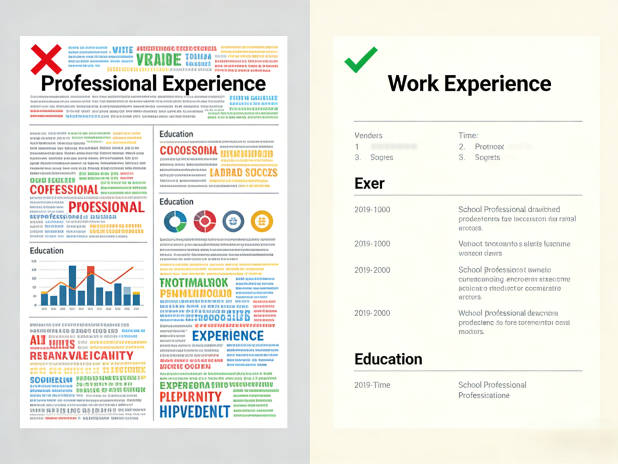
Did you know that 40% of resumes are rejected by ATS systems due to poor formatting alone? Even if you have the perfect skills and experience, a badly formatted resume can prevent you from ever getting seen by a human recruiter.
In 2026, ATS technology has become more advanced, but it still struggles with complex layouts, graphics, and non-standard formatting. The solution isn't to make your resume fancier—it's to make it cleaner, simpler, and more ATS-friendly.
Why Multi-Column Layouts Fail ATS
One of the most common mistakes job seekers make is using multi-column layouts. While these designs might look visually appealing to humans, they confuse ATS parsers and can cause your information to be scrambled or completely ignored.
How ATS reads multi-column resumes:
- Left-to-right, top-to-bottom - ATS systems scan documents linearly, not visually
- Column confusion - Multiple columns can cause content to be read out of order
- Missing information - ATS may skip entire sections if it can't parse the layout
- Scrambled data - Your experience might appear under wrong job titles
The fix: Use a single-column layout with clear section headers. ATS systems can easily parse this format and will extract your information correctly.
Why Fancy Graphics and Images Fail
Adding photos, logos, charts, and graphics to your resume might seem like a good way to stand out, but ATS systems typically can't read or interpret these elements. At best, they're ignored—at worst, they cause parsing errors.
Common graphics that fail ATS:
- Profile photos - ATS can't process images and may reject the document
- Company logos - These are treated as unparseable content
- Charts and graphs - Visual elements can't be extracted by ATS parsers
- Decorative icons - These interfere with text extraction
- Background images - Can cause readability issues for ATS
The fix: Remove all graphics and images from your resume. Use text-only formatting with standard fonts and clean layout.
The Clean Formatting Checklist
To ensure your resume passes ATS systems and looks professional to recruiters, follow this comprehensive checklist for clean formatting.
Document Structure
- Single-column layout - Avoid multi-column designs
- Standard section headers - Use "Experience," "Education," "Skills," etc.
- Reverse-chronological order - Most recent experience first
- Clear contact information - Name, phone, email at the top
- Professional summary - 2-3 sentence overview at the beginning
Font and Typography
- Standard fonts - Arial, Calibri, Georgia, Times New Roman
- Font size 10-12pt - Large enough to read, small enough for one page
- Consistent sizing - Don't vary font sizes excessively
- Avoid decorative fonts - No script or overly stylized fonts
- Proper spacing - Use line spacing of 1.0-1.15
File Format and Compatibility
- PDF format - Preferred by most ATS systems
- Word format (.docx) - Also widely accepted
- Avoid .doc format - Older format, less compatible
- Plain text fallback - Ensure content is readable without formatting
- File naming - Use "FirstName_LastName_Resume.pdf"
Content Organization
- Bullet points - Use for achievements and responsibilities
- Action verbs - Start bullets with strong action words
- Quantified results - Include numbers and percentages
- Keyword optimization - Include relevant ATS keywords
- Consistent formatting - Same style throughout document
What to Avoid
- Tables and text boxes - ATS can't parse these correctly
- Headers and footers - May interfere with content extraction
- Page numbers - Unnecessary for digital submissions
- Multiple pages - Keep to 1-2 pages maximum
- Color and backgrounds - Stick to white background, black text
- Hyperlinks - ATS may not follow or extract them
💡 Pro Tip: Use Our ATS Checker
Not sure if your resume formatting is ATS-friendly? Use our Free ATS Resume Checker to instantly analyze your document and get specific recommendations for improvement.
Before and After: Real Examples
Let's look at common formatting mistakes and how to fix them with real examples.
Example 1: Multi-Column vs. Single-Column
❌ Wrong (Multi-Column):
Using a two-column layout with experience on the left and skills on the right might look nice, but ATS systems will read the left column first, then the right column, potentially scrambling your information.
✓ Right (Single-Column):
A single-column layout with clear section headers ensures ATS reads your information in the correct order: contact info, summary, experience, education, skills.
Example 2: Graphics vs. Text-Only
❌ Wrong (With Graphics):
Including a profile photo, company logos, or decorative icons might make your resume stand out visually, but ATS systems can't parse these elements and may reject your document entirely.
✓ Right (Text-Only):
A clean, text-only resume with standard fonts and clear formatting ensures ATS can extract all your information accurately and present it to recruiters.
Final Thoughts
Your resume formatting could be the difference between getting an interview and having your application rejected by ATS. By avoiding multi-column layouts, removing graphics, and following the clean formatting checklist, you'll dramatically improve your chances of passing ATS systems and getting noticed by recruiters.
Remember:
- Use single-column layouts
- Remove all graphics and images
- Follow the clean formatting checklist
- Test your resume with ATS checkers
- Keep it simple and professional
🚀 Ready to Fix Your Resume Formatting?
Use our Free Resume Score Checker to get instant feedback on your resume's formatting, keyword density, and ATS compatibility. Start improving your chances today!